
Securely adding passwords and files to GitLab
Last updated on 2026-01-14 | Edit this page
Overview
Questions
- How can I securely store my grid certificate and password in GitLab without exposing them?
- Why can’t I simply copy my grid certificate files into my GitLab repository?
- How do I restore and use grid credentials in a CI job?
Objectives
- Understand why grid credentials must be encoded and stored as protected CI/CD variables.
- Encode grid certificates and passwords using
base64and add them securely to GitLab. - Restore grid certificate files and obtain a VOMS proxy in a CI job to access CMS data.
- A valid grid certificate issued by CERN, and installed in
~/.globus/usercert.pemand~/.globus/userkey.pem.
Unless you are very familiar with CMSSW and CMS data access, the previous pipeline will likely fail when trying to access data on EOS via XRootD. This is because accessing CMS data typically requires a valid grid proxy.
In your local environment (e.g., LXPLUS or cmslpc), you obtain a grid
proxy using the voms-proxy-init command, which relies on
your grid certificate files (usercert.pem and
userkey.pem) stored in ~/.globus/. However,
GitLab CI jobs run in isolated environments and have no
access to your local grid proxy.
Additionally, you must never store grid certificate files or passwords directly in your GitLab repository—this would expose sensitive information. Instead, securely add them as CI/CD variables in GitLab.
Obtaining a Grid Certificate
To access CMS data, you need a grid certificate (also called a Virtual Organization Membership Service (VOMS) proxy). If you don’t have one yet, request it from the CERN Grid CA, or follow these instructions.
Your grid certificate consists of two files:
Output (example):
OUTPUT
Bag Attributes
    localKeyID: 95 A0 95 B0 1e AB BD 13 59 D1 D2 BB 35 5A EA 2E CD 47 BA F7
subject=/DC=ch/DC=cern/OU=Organic Units/OU=Users/CN=username/CN=123456/CN=Anonymous Nonamious
issuer=/DC=ch/DC=cern/CN=CERN Grid Certification Authority
-----BEGIN CERTIFICATE-----
TH1s1SNT4R34lGr1DC3rt1f1C4t3But1Th4s4l3NgtH0F64CH4r4ct3rSP3rL1N3
...
-----END CERTIFICATE-----
Keep your secrets secret
Never expose your grid certificate files or passwords!
- Never store certificates or passwords in version control. Even if
you delete them from
HEAD, they remain in the commit history. - Storing secrets in a shared repository violates grid policy and can lead to access revocation.
- If you accidentally commit sensitive data, immediately follow GitHub or GitLab removal guides—but treat the data as compromised.
For more details, see GitLab CI/CD variables documentation.
Encoding Certificates with base64
GitLab variables must be plain strings without line breaks. To
preserve the structure of your certificate files, encode them using
base64.
Example: Encoding a Certificate
(On Linux, add -w 0 to disable line wrapping; on macOS,
use -D to decode instead of -d.)
Output (example):
OUTPUT
QmFnIEF0dHJpYnV0ZXMKICAgIGxvY2FsS2V5SUQ6IDk1IEEwIDk1IEIwIDFlIEFCIEJEIDEzIDU5IEQxIEQyIEJCIDM1IDVBIEVBIDJFIENEIDQ3IEJBIEY3CnN1YmplY3Q9L0RDPWNoL0RDPWNlcm4vT1U9T3JnYW5pYyBVbml0cy9PVT1Vc2Vycy9DTj11c2VybmFtZS9DTj0xMjM0NTYvQ049QW5vbnltb3VzIE5vbmFtaW91cwppc3N1ZXI9L0RDPWNoL0RDPWNlcm4vQ049Q0VSTiBHcmlkIENlcnRpZmljYXRpb24gQXV0aG9yaXR5Ci0tLS0tQkVHSU4gQ0VSVElGSUNBVEUtLS0tLQpUSDFzMVNOVDRSMzRsR3IxREMzcnQxZjFDNHQzQnV0MVRoNHM0bDNOZ3RIMEY2NENINHI0Y3QzclNQM3JMMU4zCjFhbVQwMExhMllUMHdSMVQzNDVtMHIzbDFOM1MwZm4wbnMzTlMzUzAxL2xMU3QwcEgzcjNBbmRBRGRzUEFjM1MKLi4uNDUgbW9yZSBsaW5lcyBvZiBsMzN0IGRpYWxlY3QuLi4KKzRuZCtoZUw0UyszOGNINHI0YytlcnNCZWYwckUrSEUxK2VuRHM9PQotLS0tLUVORCBDRVJUSUZJQ0FURS0tLS0tCg==To verify encoding works, decode it back:
This should return your original certificate.
Decode a Secret Message
Try decoding this base64-encoded message:
SSB3aWxsIG5ldmVyIHB1dCBteSBzZWNyZXRzIHVuZGVyIHZlcnNpb24gY29udHJvbAo=Use the base64 command with the -d (Linux)
or -D (macOS) flag.
Adding Secrets to GitLab
Now encode your grid password and certificates. For your password:
(Use single quotes ', not double quotes ".
Include -w 0 on Linux.)
Adding Variables in GitLab
Now we know how to encode our grid certificate files, we can add them as CI/CD variables in GitLab. These variables are passed to the job environment when a job is run, and can be used in the job scripts. This way, we can avoid storing sensitive information directly in the repository.
Adding Grid Certificate and Password to GitLab
Now that we know how to encode our grid certificate files, we can add them as CI/CD variables in GitLab. These variables are passed to the job environment when a job runs, and can be used in the job scripts. This way, we avoid storing sensitive information directly in the repository.
There are a couple of important things to keep in mind when adding passwords and certificates as variables to GitLab:
-
Variables should always be set to
Protectedstate. This ensures that they are only available in protected branches, e.g., yourmasterormainbranch. This is important when collaborating with others, since anyone with access could simplyechothe variables in a merge request if automated tests run on merge requests. -
As an additional safety measure, set them as
Maskedas well if possible. This will prevent your password from appearing in job logs. (Note: masking may not work perfectly for certificates due to their length, but should work for your grid password.)
For more details, see the GitLab CI/CD variables documentation. If you upload sensitive data by mistake, immediately follow the guidance on Removing Sensitive data on Github or on Gitlab.
Encoding Your Credentials
For your grid proxy password, encode it using base64
(make sure nobody’s peeking at your screen):
Use single quotes ('), not double quotes
("). On Linux, add -w 0 to disable line
wrapping (by default, base64 wraps after 76 characters).
For the two certificates, use them directly as input:
Copy the full output into GitLab.
Every Equal Sign Counts!
Make sure to copy the full string including trailing equal signs.
Adding Variables in GitLab UI
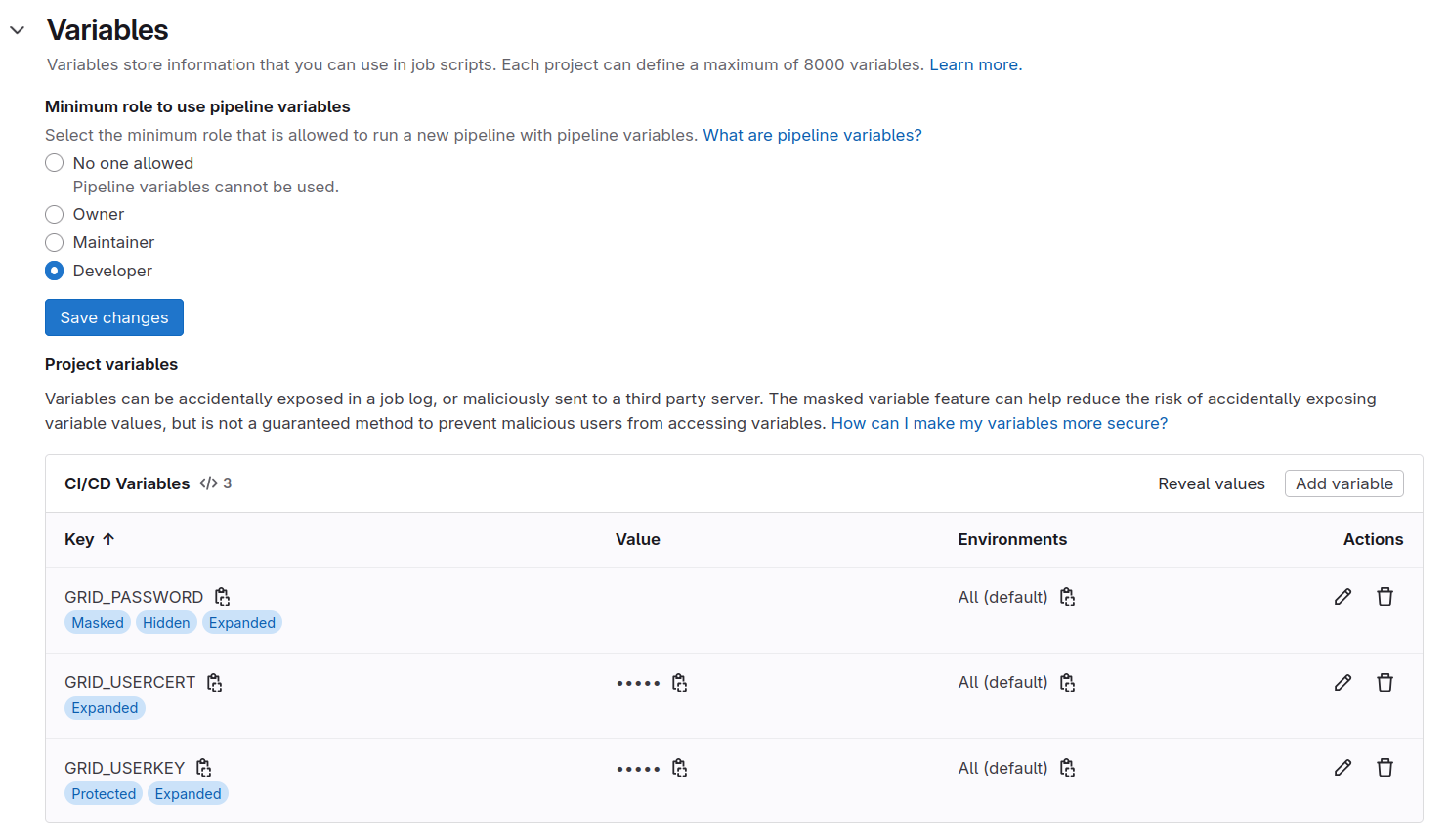
Go to Settings > CI/CD > Variables in your GitLab project. Add the following three variables:
| Variable | Value |
|---|---|
GRID_PASSWORD |
(base64-encoded password) |
GRID_USERCERT |
(base64-encoded usercert.pem) |
GRID_USERKEY |
(base64-encoded userkey.pem) |
For each variable:
- Check Protected (so it’s only available on
protected branches like
master/main). - Check Masked (so values won’t appear in job logs—especially important for the password).
The Settings > CI/CD > Variables section should look like this:
Protect Your Main Branch
To reduce the risk of leaking passwords and certificates to others,
go to Settings > Repository > Protected Branches
and protect your master or main branch. This
prevents collaborators from pushing directly and accidentally exposing
secrets in job logs.
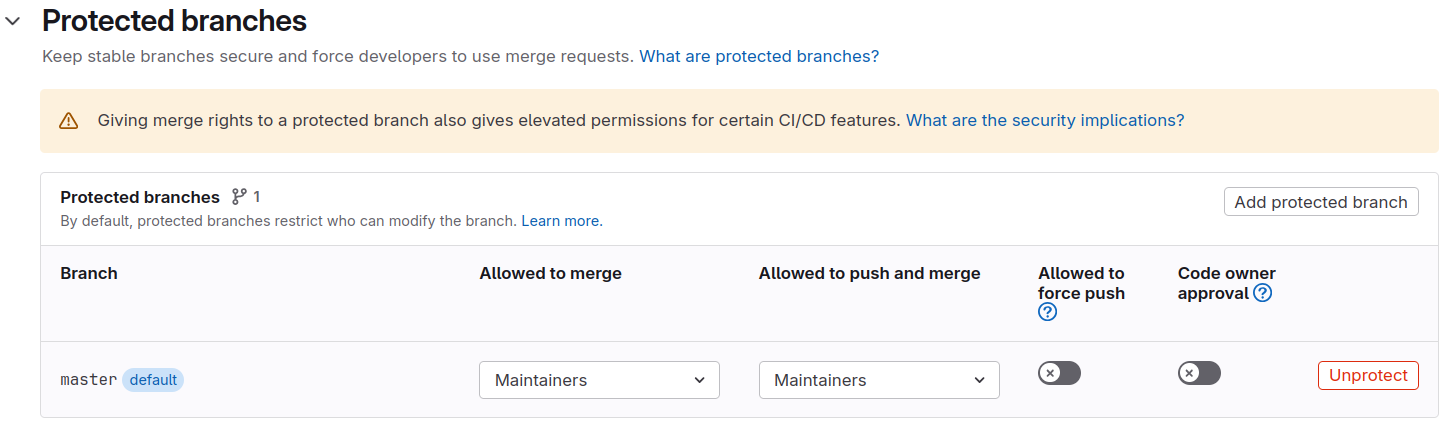
With the Protected option enabled for variables, they are only available to those protected branches (though Maintainers can still push to them).
Using the Grid Proxy in CI
With secrets stored, you can now restore the certificate files and obtain a grid proxy in your CI job:
BASH
mkdir -p ${HOME}/.globus
printf "${GRID_USERCERT}" | base64 -d > ${HOME}/.globus/usercert.pem
printf "${GRID_USERKEY}" | base64 -d > ${HOME}/.globus/userkey.pem
chmod 400 ${HOME}/.globus/userkey.pem
printf "${GRID_PASSWORD}" | base64 -d | voms-proxy-init --voms cms --pwstdin
voms-proxy-info --all
Example GitLab CI Job
The standard CentOS 7 CMSSW image lacks CMS-specific certificates. Use the CMS-specific image instead:
YAML
voms_proxy_test:
  image:
    name: gitlab-registry.cern.ch/cms-cloud/cmssw-docker/cc7-cms:latest
    entrypoint: [""]
  stage: compile
  tags:
    - k8-cvmfs
  script:
    - mkdir -p ${HOME}/.globus
    - printf "${GRID_USERCERT}" | base64 -d > ${HOME}/.globus/usercert.pem
    - printf "${GRID_USERKEY}" | base64 -d > ${HOME}/.globus/userkey.pem
    - chmod 400 ${HOME}/.globus/userkey.pem
    - printf "${GRID_PASSWORD}" | base64 -d | voms-proxy-init --voms cms --pwstdin
    - voms-proxy-info --all
    - voms-proxy-destroy
The entrypoint: [""] override is needed to ensure the
job runs your custom script instead of a default entrypoint.
Test Your Setup
Before moving to the next section, commit and push your
.gitlab-ci.yml, navigate to CI/CD >
Pipelines, and verify:
- The job runs on a
cvmfsrunner. -
voms-proxy-initsucceeds without errors. -
voms-proxy-infodisplays your proxy details.
If proxy creation fails, check the job logs and verify all three variables are set correctly (especially trailing equal signs in base64 strings).
Once your grid proxy works, you can extend the pipeline to run your
analysis with cmsRun and access CMS data on EOS!
Even with the voms_proxy_test job added, you still need
to export your grid proxy as artifact and added in the analysis job to
access data on EOS.
Here is an example of how to do this:
YAML
stages:
  - compile
  - run
  - check

variables:
  CMS_PATH: /cvmfs/cms.cern.ch
  CMSSW_RELEASE: CMSSW_10_6_30
  SCRAM_ARCH: slc7_amd64_gcc700

cmssw_compile:
  image: registry.cern.ch/docker.io/cmssw/el7:x86_64
  stage: compile
  tags:
    - k8s-cvmfs
  script:
    - set +u && source ${CMS_PATH}/cmsset_default.sh; set -u
    - export SCRAM_ARCH=${SCRAM_ARCH}
    - cmsrel ${CMSSW_RELEASE}
    - cd ${CMSSW_RELEASE}/src
    - cmsenv
    - mkdir -p AnalysisCode
    - cp -r $CI_PROJECT_DIR/ZPeakAnalysis AnalysisCode/
    - cd ${CMSSW_BASE}/src
    - scram b -j 4
  artifacts:
    untracked: true
    expire_in: 1 hour
    paths:
      - ${CMSSW_RELEASE}

voms_proxy_test:
  stage: compile
  image: gitlab-registry.cern.ch/cms-cloud/cmssw-docker/al9-cms:latest
  tags:
    - k8s-cvmfs
  script:
    - mkdir -p ${HOME}/.globus
    - printf "${GRID_USERCERT}" | base64 -d > ${HOME}/.globus/usercert.pem
    - printf "${GRID_USERKEY}" | base64 -d > ${HOME}/.globus/userkey.pem
    - chmod 400 ${HOME}/.globus/userkey.pem
    - printf "${GRID_PASSWORD}" | base64 -d | voms-proxy-init --voms cms --pwstdin
    - voms-proxy-info --all
    - export VOMSPROXY=$(voms-proxy-info -path)
    - mkdir proxy
    - cp ${VOMSPROXY} proxy/x509_proxy
  artifacts:
    paths:
      - proxy

cmssw_run:
  needs:
    - cmssw_compile
    - voms_proxy_test
  stage: run
  image: registry.cern.ch/docker.io/cmssw/el7:x86_64
  tags:
    - k8s-cvmfs
  script:
    - set +u && source ${CMS_PATH}/cmsset_default.sh; set -u
    - export SCRAM_ARCH=${SCRAM_ARCH}
    - export X509_USER_PROXY=${PWD}/proxy/x509_proxy
    - mkdir run
    - cp -r ${CMSSW_RELEASE} run/
    - chmod -R +w run/${CMSSW_RELEASE}/
    - cd run/${CMSSW_RELEASE}/src
    - cmsenv
    - voms-proxy-info --all
    - cd AnalysisCode/ZPeakAnalysis/
    - cmsRun test/MyZPeak_cfg.py
      #- cmsRun test/MyZPeak_cfg.py inputFiles=root://cms-xrd-global.cern.ch//store/user/cmsdas/2026/short_exercises/cat/datasets/MINIAODSIM/RunIISummer20UL17MiniAODv2-106X_mc2017_realistic_v9-v2/DYJetsToLL_M-50_TuneCP5_13TeV-amcatnloFXFX-pythia8/2C5565D7-ADE5-2C40-A0E5-BDFCCF40640E.root   #### in case the previous does not work
    - ls -l myZPeak.root
  artifacts:
    untracked: true
    expire_in: 1 hour
    paths:
      - run/${CMSSW_RELEASE}/src/AnalysisCode/ZPeakAnalysis/myZPeak.root

check_events:
  needs:
    - cmssw_compile
    - cmssw_run
  stage: check
  image: registry.cern.ch/docker.io/cmssw/el7:x86_64
  tags:
    - k8s-cvmfs
  script:
    - set +u && source ${CMS_PATH}/cmsset_default.sh; set -u
    - export SCRAM_ARCH=${SCRAM_ARCH}
    - cp -r ${CMSSW_RELEASE} run/
    - chmod -R +w run/${CMSSW_RELEASE}/
    - cd run/${CMSSW_RELEASE}/src
    - cmsenv
    - cd AnalysisCode/ZPeakAnalysis/
    - python test/check_number_events.py --input ${CMSSW_BASE}/src/AnalysisCode/ZPeakAnalysis/myZPeak.root
- python test/check_cutflows.py number_of_events.txt test/number_of_expected_events.txt- Never store grid certificates or passwords in version control; they remain in commit history and violate grid policy.
- Encode grid certificates and passwords with
base64and store them as protected CI/CD variables in GitLab. - Set variables to
Protected(available only on protected branches) andMasked(hidden in logs) for maximum security. - Restore grid certificate files and obtain a VOMS proxy in CI jobs
using
base64 -dandvoms-proxy-init --pwstdin.