
Visualizing the Workflow
Last updated on 2026-02-17 | Edit this page
Overview
Questions
- How can I see the dependencies between my rules?
- What is a Directed Acyclic Graph (DAG)?
- How do I preview what Snakemake intends to do?
Objectives
- Use the
--dagflag to generate a visualization of the analysis. - Understand the difference between the Rule Graph and the File Graph.
- Use dry-runs (
-n) to verify the execution plan.
Seeing the Big Picture
As your analysis grows from 2 rules to 20, and from 3 samples to 300, it becomes impossible to keep the entire workflow in your head. Snakemake provides built-in tools to “draw” your analysis for you.
The Directed Acyclic Graph (DAG)
Snakemake represents your workflow as a DAG:
- Directed: There is a clear flow from raw data to final plots.
- Acyclic: There are no loops (you can’t have a file that depends on its own output).
- Graph: A mathematical structure of nodes (rules/files) and edges (dependencies).
Generating the DAG
To create a visualization, we tell Snakemake to generate the DAG in a
format called dot, and then we use the
graphviz tool (which we installed via pixi in
the setup) to turn it into an image.
BASH
pixi run snakemake --dag | dot -Tpng > dag.png
# pixi run snakemake --dag | dot -Tpdf > dag.pdf   ### For PDF format
How to read the DAG:
- Nodes (Boxes): Represent the jobs that need to be run.
- Arrows: Represent the flow of data.
- Solid vs. Dashed lines: In many viewers, a dashed border indicates that the file already exists and the job doesn’t need to run.
Activity: Visualizing our Scaled Workflow
Ensure you have the Snakefile from the previous episode (with
DYJets,TTbar,Data, andWJets).Run the DAG command:
It has been reported that the command above may not work due to
differences in how dot is handled. If you encounter issues,
try the following command instead:
or you can run:
- Open
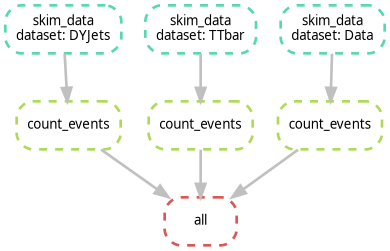
dag.png, it should look like the following image. Notice how the branches for each dataset are parallel.
Exercise: Identifying the Bottleneck
Look at your DAG. If you were to run this on a machine with only 1 core, how many steps would it take? If you had 4 cores, how would the timing change?
With 1 core, Snakemake runs every job sequentially. With 4 cores,
Snakemake can run all four skim_data jobs simultaneously,
significantly reducing the “Wall Clock” time of your analysis. This is
the power of a DAG-based system!
Rule Graph vs. File Graph
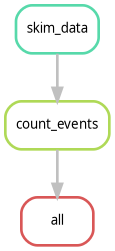
If you have 1,000 samples, the --dag command will
produce a giant PDF with 1,000 boxes, which is unreadable. To see a
simplified version that only shows how the rules connect (ignoring the
individual samples), use:
This is often much more useful for complex CMS analyses to ensure the logic is correct.
The Dry-Run: “Look Before You Leap”
Before you submit 1,000 jobs to a cluster, you should always perform a Dry-Run. This tells Snakemake to calculate the DAG and print the execution plan without actually running any commands.
If you want more detail (like seeing the actual shell commands that will be executed), use:
If you run this commands on top of finished workflow, you should see something like:
OUTPUT
Building DAG of jobs...
Nothing to be done (all requested files are present and up to date).
This is expected, because all the output files already exist. If you change something in your Snakefile (like adding a new rule or changing an existing one), the dry-run will show you which jobs need to be re-run.
Alternatively, if you want to see the dry-run or the commands to execute, use:
- DAG: A visual map of your analysis dependencies.
- Dry-run (-n): Always perform a dry-run to verify the plan before executing.
- Rule Graph: A simplified visualization showing the relationship between rules rather than individual files.